FHP Portal FAQs
FHP Patient Portal Frequently Asked Questions
What is the FHP Patient Portal?
The FHP Patient Portal is an online resource you can use to view upcoming appointments, access your health record (including medications lists, test results and immunization records), and much more. This valuable tool allows you to manage your health care at your convenience and access your health information whenever you need it.
Do I need a new patient portal?
If you had an active FMH Patient Portal account, you will NOT need to create a new account. If you previously only used the TVC or Porter Heart patient portals, we encourage you to sign up for the FMH Patient Portal as soon as possible to be auto-enrolled in the new portal.
New portal features following June 1 will include:
- Message your care team
- Review visit summaries
- Video visits with your provider (at participating clinics)
- View test results
- View medication lists
Who can I contact for help with the new portal
For assistance with FHP Patient Portal
email our Portal Team.
For technical assistance with your account,
including password resets call:
877-621-8014
Why did my portal change
We are updated our electronic health record to be more inclusive of the entire FHP health system, and the new patient portal was a part of that transition.
Benefits of a system-wide EHR:
- Your doctors and care teams can see your full medical history in one place
- Information moves more easily between the hospital and clinics
- Your care is more coordinated and efficient
- We can better serve you in the future
This means one patient, one record across the entire FHP health system.
What if I decline to use the patient portal?
Using the patient portal is optional. If you choose not to use the portal, you will still receive care and have access to your health information.
If you decline the patient portal:
- You can still schedule appointments by phone or in person.
- Your care team can still contact you by phone, mail, or other available methods.
- You may request copies of your medical records through the clinic or hospital’s standard records process.
- You will continue to receive medical treatment and services without interruption.
However, you may not have online access to features such as:
- Video visits with your provider
- Viewing test results electronically
- Secure messaging with your care team
- Online appointment scheduling
- Electronic billing or statements
- Access to visit summaries and health records online
You can choose to enroll in the patient portal at a later time if you change your mind.
How do I access my health information with the FHP Patient Portal?
Go to the self-enrollment tool.
You will be asked to enter your name, date of birth, and your social security number. This information is used to verify your identity, it is not being “collected”, because if you have been a patient at Fairbanks Memorial Hospital, or utilized any of its clinical services, this information is already part of your medical record.
Once you have verified your identity, look for “I Need an Account” on the next screen, and enter your email address to create your patient portal account.
NOTE: If you have never been a patient at Fairbanks Memorial Hospital, or utilized any of FHP's clinical services, you will not have information to view through the patient portal, and you will not be able to access an account.
Who can access their information with the FHP Patient Portal?
Individuals who have been patients at Fairbanks Memorial Hospital, or otherwise utilized any of FHP's clinical services, are 13 and older, and have not been otherwise restricted, may establish an account in the FHP Patient Portal and access their health information.
I have power of attorney or guardianship of another adult person; how can I access their patient portal?
You can access their patient portal through a proxy account which is granted by FHP. To submit a request for the proxy account, please email FHPportal@foundationhealth.org. You will be required to provide a photo ID and power of attorney or guardianship documentation for the approval process.
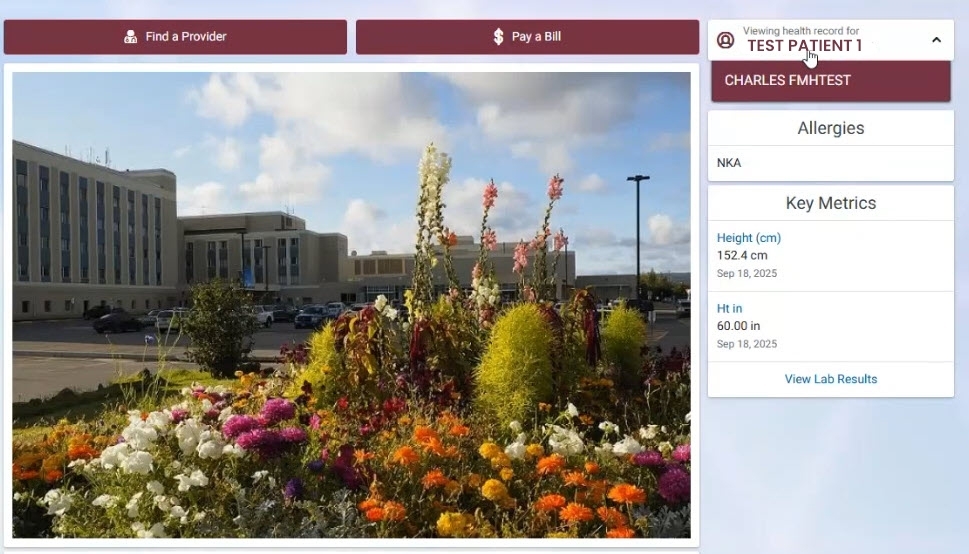
For your proxy access, you must have an existing FHP Patient Portal account. To view the proxy account once access is granted, log into your portal and use the pulldown option as shown below to toggle between your portal view and the proxy view.
Who can access their information with the FHP Patient Portal?
Individuals who have been patients of Fairbanks Memorial Hospital, or otherwise utilized any of FHP clinic services, are 18 and older, and have not been otherwise restricted, may establish an account in the FHP Patient Portal and access their health information.
How is my Protected Health Information handled and safeguarded in the FHP Patient Portal?
The FHP Patient Portal is run using the HealtheLife technology from Cerner. HealtheLife is, in general, a pass-through system. Clinical data is housed in an underlying electronic medical record (EMR) system (Cerner Millennium). When a user requests EMR data, the Cerner Millennium system is queried for the data at the time of the request. For clients that host Cerner Millennium on-site (such as FMH), communication between the portal and Cerner
Millennium occurs over a secure virtual private network (VPN). Some data is stored temporarily in memory within the portal system itself for performance reasons, and some data is stored permanently in the portal when it can't be stored in the underlying EMR for the purpose of enabling capabilities that cannot otherwise be achieved. Examples:
- Storage of data about user accounts, such as name, date of birth (DOB), email, and authorized patients.
- Storage of information pertaining to what sort of information end-users have accessed, and information about which patients accessed their information on the portal, to enable tracking and reporting for compliance reasons.
- The portal does not grant or allow access to any Protected Health Information (PHI) or personally identifiable information (PII, as defined by the Health Insurance Portability and Accountability Act: HIPAA), to anyone other than the intended user and authorized Cerner associates.
If I no longer want to have a patient portal account, how do I deactivate my account?
If you have already setup an account on the FHP patient portal and would like it deactivated/closed, please email FHPportal@foundationhealth.org with your request for account deactivation/closure. Please include your full name and a current phone number where you can be reached, so that we can contact you and complete the deactivation process.
How do I request to have outdated or incorrect information in the portal changed?
To request that medical information be changed, contact the FMH Medical Records Department via email at fmhrecords@foundationhealth.org and indicate your full name, current phone number and the requested changes.
To request that personal general/demographic information such as your address, email or phone number be changed, click the dropdown menu in the upper bar under your name, choose “Patient Information” and update the outdated information, then select “Send update request”. Any changes you make will be reviewed by the FMH Registration Department and they will contact you to confirm the changes before they are made in the hospital’s records.
How do I view my appointments?
Select “View Upcoming Appointments” in the top navigation section of the Patient Portal page.
What do I do if I am having problems self-enrolling for an account or claiming an account invitation for the FHP patient portal?
If you do not yet have your account setup and you could use some help self-enrolling for an account or claiming an account invitation for the FMH patient portal, please send us an email at FHPportal@foundationhealth.org with your request for help setting up an account. Please include your full name and a current phone number where you can be reached, so that we can contact you and assist you with the account activation process.
What do I do if I am having problems accessing or using the FHP patient portal after I have an account setup?
If you already have your account setup and you could use some help accessing or using it, please call 877-621-8014 and be ready to give your Cerner patient portal support representative your full name, your date of birth, and your current email address to help them find your account and assist you.

For assistance enrolling
in the FHP Patient Portal
Email FHP Portal Team
For technical assistance
with your account,
including password resets call:
877-621-8014
Page Options


